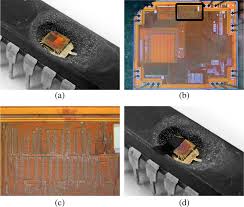
Copying a microcontroller program means reading the code that already lives inside a chip and turning it back into a file you can archive, compare, or load into another unit. On an unlocked part that is a five-minute job for any programmer. On a production part with code read protection enabled, the same request returns nothing but zeros, and the question becomes a hardware one: how do you get the die to give up its contents when the silicon is built to refuse.
Why A Protected MCU Returns Nothing
Read protection is not one mechanism but a family of them, and each vendor implements it differently. NXP LPC parts use Code Read Protection levels that close the debug port and restrict ISP entry once CRP1 or higher is set. STM32 parts use readout protection at level 1 or 2, where level 2 closes the debug interface permanently. AVR parts use lock bits that disable both the debugWIRE interface and program memory verification. Older 8051 and PIC families gate access behind a security fuse.
The common outcome is the same. The debug port refuses to connect, a memory read comes back as a uniform pattern of zeros or 0xFF, and the bootloader rejects any attempt to verify the flash contents. Nothing is necessarily broken; the part is simply answering every question with a refusal.
What The Copy Has To Contain
A usable copy is more than a blob of code. Three things usually have to come out together, and skipping any of them produces a file that will not reproduce the original behaviour:
- Program flash — the actual machine code, including any bootloader region that sits above the application.
- Data EEPROM — calibration constants, serial numbers, run-hour counters and keys that the firmware expects to find at fixed addresses.
- Option or configuration bytes — brown-out thresholds, watchdog settings, clock source selection and the protection state itself.
A dump that captures only the flash leaves the receiver with a program that boots into a fault because its calibration table is empty. This is the single most common reason a copied file fails on a new board.
How The Program Is Actually Pulled Out
There is no universal trick. The route depends on the part, its package, and exactly which protection level is active. In practice a read-out follows one of four paths, chosen after the device has been inspected:
- Debug or bootloader entry — when protection is partial or a vendor-specific backdoor sequence exists, the memory can be read through the intended interface without touching the package.
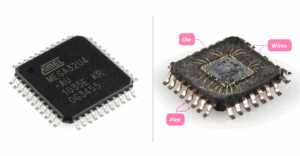
- Decapsulation and direct readout — the epoxy or ceramic lid is removed to expose the die, and the flash array is read optically or with a microprobe. This is the path of last resort and the most expensive.
- Fault injection — a precisely timed voltage or clock glitch forces the part past its protection check during boot, after which the flash can be read normally.
- Side-channel analysis — power consumption or electromagnetic emission is measured while the chip runs and correlated against known operations to recover internal state.
On a well-protected modern part, one route rarely suffices. A typical job combines a non-invasive attempt first, then a decapsulation step if the fuse holds, then a repair pass if the die was damaged in the process.
Flash And EEPROM Are Two Separate Jobs
Flash and data EEPROM sit in different arrays and are often protected independently. Flash is organised in pages or sectors and is usually read as a whole image, because a partial read leaves the vector table pointing at gaps. EEPROM is typically a small array holding the values the program needs at run time — the part-specific calibration that makes one unit behave differently from the next.
On some parts the EEPROM survives a mass erase that wipes the flash, and on others it is cleared at the same moment. Whether you need the EEPROM recovered has a direct effect on the method and the price, so it is worth deciding before the job starts rather than after.
What The Delivered File Looks Like
The output is normally an Intel HEX image with the original addresses preserved, alongside a raw binary for tools that expect one. Both are accompanied by a checksum and a short memory map showing which regions were read, which were empty, and which could not be reached. Where a region is unreadable — a protected boot sector or a one-time-programmable area — the report says so explicitly instead of filling the gap with zeros.
Correctness is checked by reading the device twice through independent paths and comparing the two images byte for byte. If the two reads disagree, the job is not finished.
Time And Cost Are Driven By Four Things
Two parts with the same part number can take very different amounts of work, because the variables that matter are physical rather than electrical:
- Package — a QFP or SOP can often be handled without decapsulation, while a BGA or chip-on-board assembly needs more preparation before the die is even reachable.
- Protection level — a level-1 part may open through a glitch in an afternoon, while a level-2 part with an active shield can take weeks.
- Die condition — a part that has already been attacked, over-etched, or damaged during removal costs more to recover.
- Quantity — the first unit carries the entire setup cost; additional units of the same type are far cheaper once the path is known.
What We Ask For Before Starting
A read-out request moves faster when it arrives with the details that determine the route. We ask for the full part number including any suffix, a clear photograph of the package marking, the board it came from if the part is soldered down, and a statement that you own the design or hold the rights to the firmware. Work is only accepted on that basis.
Frequently Asked Questions
Can a program be copied from a chip with read protection enabled? Yes, in most cases, but through hardware work rather than a programmer. The protection blocks software access, not physical readout.
Does the chip survive the process? Non-invasive routes leave the part working. Decapsulation is destructive by nature — the package is opened — and the die may not be reusable afterwards, though the extracted data is unaffected.
Do I receive source code? No. What comes back is the compiled machine code and the data arrays. Recovering readable source from a binary is a separate reverse-engineering exercise and is not part of a read-out.
How do I know the copy is correct? Every delivery includes a checksum and a memory map, and the image is verified by two independent reads before it is released.
Can you handle a single unit? Yes. Single-unit work is the normal case; volume only becomes relevant when the same part type repeats.
Related Reading
If the part in question is a Microchip 32-bit device, the PIC32MX extraction index lists every device in that branch with its flash geometry. For the wider process see extracting MCU embedded firmware, and for the physical side of the work see MCU extraction. To start a job, send the part details through the contact form or review the services we offer.
Leave a Reply